
Claude Desktop (MCP)
Schedule posts directly from Claude Desktop using natural language
Schedule social media posts directly from Claude Desktop using natural language. No coding required.
This uses the Model Context Protocol (MCP) to connect Claude Desktop with Late API.
What You Can Do
Ask Claude things like:
- "Post 'Hello world!' to Twitter"
- "Schedule a LinkedIn post for tomorrow at 9am"
- "Show my connected accounts"
- "Cross-post this to Twitter and LinkedIn"
- "Post this image to Instagram" (with browser upload flow)
Setup
Install uv
uv is a fast Python package manager that Claude Desktop uses to run the Late MCP server.
curl -LsSf https://astral.sh/uv/install.sh | shpowershell -c "irm https://astral.sh/uv/install.ps1 | iex"Get Your API Key
Go to getlate.dev/dashboard/api-keys and create an API key.
Configure Claude Desktop
Open Claude Desktop settings and go to Developer → Edit Config:
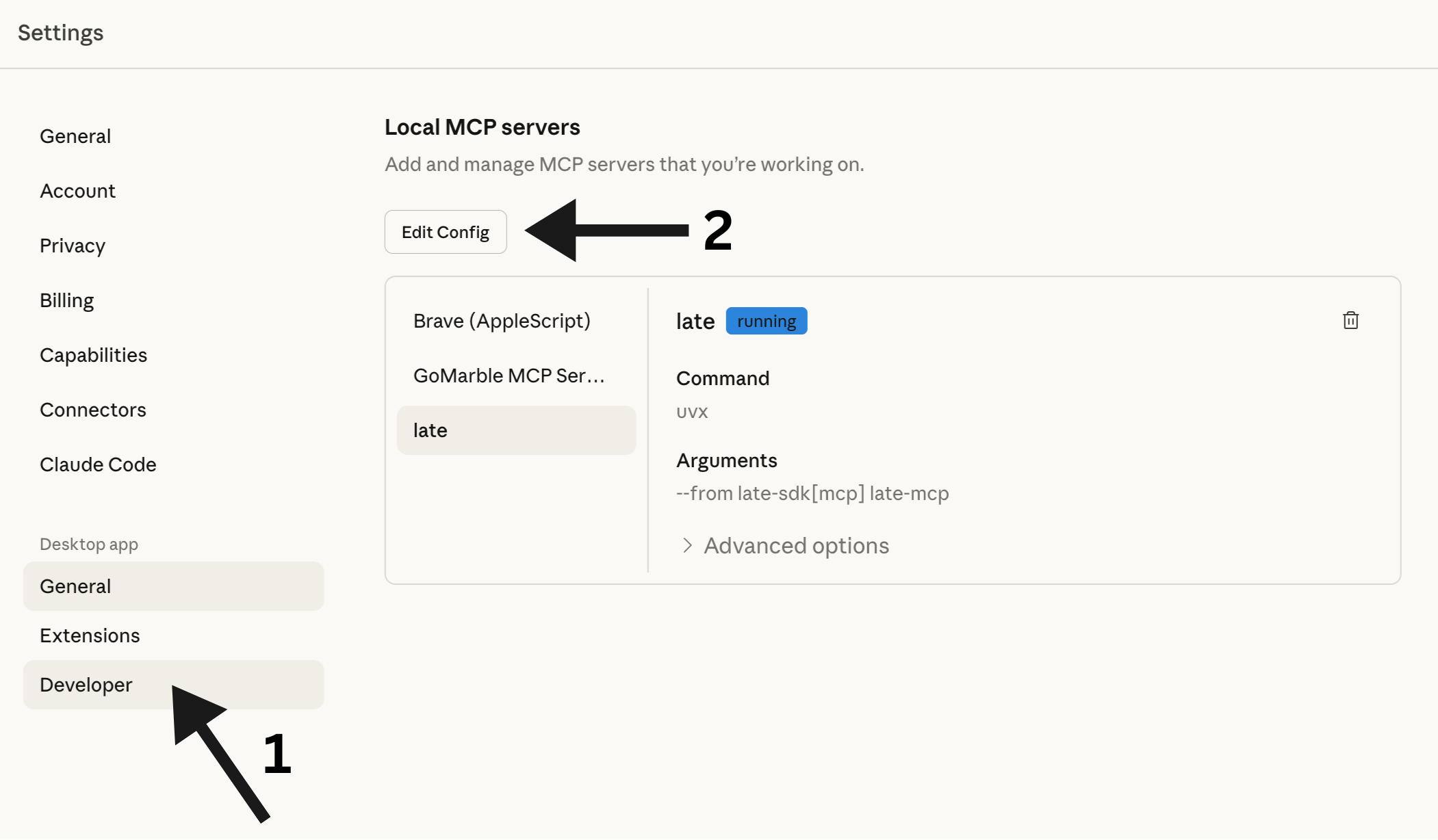
This will open the folder containing claude_desktop_config.json. Open this file with your favorite editor:
~/Library/Application Support/Claude/claude_desktop_config.json%APPDATA%\Claude\claude_desktop_config.jsonAdd the Late MCP server:
{
  "mcpServers": {
    "late": {
      "command": "uvx",
      "args": ["--from", "late-sdk[mcp]", "late-mcp"],
      "env": {
        "LATE_API_KEY": "your_api_key_here"
      }
    }
  }
}
Replace your_api_key_here with your actual API key from Step 2.
Restart Claude Desktop
Close and reopen Claude Desktop. The Late integration will be available immediately.
Alternative: Using pip
If you prefer pip over uvx:
pip install late-sdk[mcp]{
"mcpServers": {
"late": {
"command": "python",
"args": ["-m", "late.mcp"],
"env": {
"LATE_API_KEY": "your_api_key_here"
}
}
}
}Available Commands
| Command | Description |
|---|---|
accounts_list | Show all connected social media accounts |
accounts_get | Get account details for a specific platform |
profiles_list | Show all profiles |
profiles_get | Get details of a specific profile |
profiles_create | Create a new profile |
profiles_update | Update an existing profile |
profiles_delete | Delete a profile |
posts_list | List posts (optionally filter by status) |
posts_get | Get details of a specific post |
posts_create | Create a new post (draft, scheduled, or immediate) |
posts_publish_now | Publish a post immediately |
posts_cross_post | Post to multiple platforms at once |
posts_update | Update an existing post |
posts_delete | Delete a post |
posts_retry | Retry a failed post |
posts_list_failed | List all failed posts |
posts_retry_all_failed | Retry all failed posts |
media_generate_upload_link | Get a link to upload media files |
media_check_upload_status | Check if media upload is complete |
Tool Reference
Detailed parameters for each MCP tool.
Accounts
accounts_list
List all connected social media accounts. Returns the platform, username, and account ID for each connected account. Use this to find account IDs needed for creating posts.
accounts_get
Get account details for a specific platform. Returns username and ID for the first account matching the platform.
| Parameter | Type | Description | Required | Default |
|---|---|---|---|---|
platform | string | Platform name: twitter, instagram, linkedin, tiktok, bluesky, facebook, youtube, pinterest, threads | Yes | - |
Profiles
profiles_list
List all profiles. Profiles group multiple social accounts together for easier management.
profiles_get
Get details of a specific profile including name, description, and color.
| Parameter | Type | Description | Required | Default |
|---|---|---|---|---|
profile_id | string | The profile ID | Yes | - |
profiles_create
Create a new profile for grouping social accounts.
| Parameter | Type | Description | Required | Default |
|---|---|---|---|---|
name | string | Profile name | Yes | - |
description | string | Optional description | No | "" |
color | string | Optional hex color (e.g., '#4CAF50') | No | "" |
profiles_update
Update an existing profile. Only provided fields will be changed.
| Parameter | Type | Description | Required | Default |
|---|---|---|---|---|
profile_id | string | The profile ID to update | Yes | - |
name | string | New name (leave empty to keep current) | No | "" |
description | string | New description (leave empty to keep current) | No | "" |
color | string | New hex color (leave empty to keep current) | No | "" |
is_default | boolean | Set as default profile | No | false |
profiles_delete
Delete a profile. The profile must have no connected accounts.
| Parameter | Type | Description | Required | Default |
|---|---|---|---|---|
profile_id | string | The profile ID to delete | Yes | - |
Posts
posts_create
Create a social media post. Can be saved as DRAFT, SCHEDULED, or PUBLISHED immediately.
Choose the correct mode based on user intent:
- DRAFT MODE (
is_draft=true): Use when user says "draft", "save for later", "don't publish". Post is saved but NOT published. - IMMEDIATE MODE (
publish_now=true): Use when user says "publish now", "post now", "immediately". Post goes live right away. - SCHEDULED MODE (default): Use when user says "schedule", "in X minutes/hours". Post is scheduled for future publication.
| Parameter | Type | Description | Required | Default |
|---|---|---|---|---|
content | string | The post text/content | Yes | - |
platform | string | Target platform: twitter, instagram, linkedin, tiktok, bluesky, facebook, youtube, pinterest, threads | Yes | - |
is_draft | boolean | Set to true to save as DRAFT (not published, not scheduled) | No | false |
publish_now | boolean | Set to true to publish IMMEDIATELY | No | false |
schedule_minutes | integer | Minutes from now to schedule. Only used when is_draft=false AND publish_now=false | No | 60 |
media_urls | string | Comma-separated URLs of media files to attach (images, videos) | No | "" |
title | string | Post title (required for YouTube, recommended for Pinterest) | No | "" |
posts_publish_now
Publish a post immediately to a platform. The post goes live right away. This is a convenience wrapper around posts_create with publish_now=true.
| Parameter | Type | Description | Required | Default |
|---|---|---|---|---|
content | string | The post text/content | Yes | - |
platform | string | Target platform: twitter, instagram, linkedin, tiktok, bluesky, etc. | Yes | - |
media_urls | string | Comma-separated URLs of media files to attach | No | "" |
posts_cross_post
Post the same content to multiple platforms at once.
| Parameter | Type | Description | Required | Default |
|---|---|---|---|---|
content | string | The post text/content | Yes | - |
platforms | string | Comma-separated list of platforms (e.g., 'twitter,linkedin,bluesky') | Yes | - |
is_draft | boolean | Set to true to save as DRAFT (not published) | No | false |
publish_now | boolean | Set to true to publish IMMEDIATELY to all platforms | No | false |
media_urls | string | Comma-separated URLs of media files to attach | No | "" |
posts_list
List posts with optional filtering by status.
| Parameter | Type | Description | Required | Default |
|---|---|---|---|---|
status | string | Filter by status: draft, scheduled, published, failed. Leave empty for all posts | No | "" |
limit | integer | Maximum number of posts to return | No | 10 |
posts_get
Get full details of a specific post including content, status, and scheduling info.
| Parameter | Type | Description | Required | Default |
|---|---|---|---|---|
post_id | string | The post ID to retrieve | Yes | - |
posts_update
Update an existing post. Only draft, scheduled, and failed posts can be updated. Published posts cannot be modified.
| Parameter | Type | Description | Required | Default |
|---|---|---|---|---|
post_id | string | The post ID to update | Yes | - |
content | string | New content (leave empty to keep current) | No | "" |
scheduled_for | string | New schedule time as ISO string (leave empty to keep current) | No | "" |
title | string | New title (leave empty to keep current) | No | "" |
posts_delete
Delete a post by ID. Published posts cannot be deleted.
| Parameter | Type | Description | Required | Default |
|---|---|---|---|---|
post_id | string | The post ID to delete | Yes | - |
posts_retry
Retry publishing a failed post. Only works on posts with 'failed' status.
| Parameter | Type | Description | Required | Default |
|---|---|---|---|---|
post_id | string | The ID of the failed post to retry | Yes | - |
posts_list_failed
List all failed posts that can be retried.
| Parameter | Type | Description | Required | Default |
|---|---|---|---|---|
limit | integer | Maximum number of posts to return | No | 10 |
posts_retry_all_failed
Retry all failed posts at once.
Media
media_generate_upload_link
Generate a unique upload URL for the user to upload files via browser.
Use this when the user wants to include images or videos in their post. The flow is:
- Call this tool to get an upload URL
- Ask the user to open the URL in their browser
- User uploads files through the web interface
- Call
media_check_upload_statusto get the uploaded file URLs - Use those URLs when creating the post with
posts_create
media_check_upload_status
Check the status of an upload token and get uploaded file URLs.
Use this after the user has uploaded files through the browser upload page. Returns: pending (waiting for upload), completed (files ready), or expired (token expired).
| Parameter | Type | Description | Required | Default |
|---|---|---|---|---|
token | string | The upload token from media_generate_upload_link | Yes | - |
Uploading Images & Videos
Since Claude Desktop can't access files on your computer directly, we use a browser upload flow:
Ask Claude to Create an Upload Link
Say something like: "I want to post an image to Instagram"
Claude will give you a unique upload URL.
Upload Your File
Open the URL in your browser. You'll see a simple upload page where you can drag & drop your image or video.
Tell Claude You're Done
Just say "done" or "uploaded". Claude will check the status and create your post with the media attached.
Supported file types:
- Images: JPG, PNG, WebP, GIF
- Videos: MP4, MOV, WebM
- Documents: PDF
Maximum file size: 5GB
Example Conversations
Simple Post
You: Post "Just launched our new feature! 🚀" to Twitter
Claude: ✅ Published to Twitter (@yourhandle) Post ID: post_abc123
Scheduled Post
You: Schedule a LinkedIn post for tomorrow at 9am: "Excited to announce our Series A funding!"
Claude: ✅ Scheduled for LinkedIn (@yourcompany) Post ID: post_xyz789 Scheduled: 2024-12-12 09:00
Cross-Posting
You: Post "Big news coming soon..." to Twitter and LinkedIn
Claude: ✅ Published to: twitter, linkedin Post ID: post_multi456
Draft Post
You: Create a draft post for Twitter with the text "Working on something exciting..."
Claude: 📝 Draft saved for twitter (@yourhandle) Post ID: post_draft789 Status: draft
With Image
You: I want to post a product photo to Instagram
Claude: 📤 Upload link generated! Open this link in your browser to upload: http://...
You: done
Claude: ✅ Upload completed! 1 file uploaded. Now I'll create the post... ✅ Published to Instagram with 1 media file
Troubleshooting
"Command not found: uvx"
Make sure uv is installed and in your PATH:
# Check if installed
uvx --version

# If not, install it
curl -LsSf https://astral.sh/uv/install.sh | sh
You may need to restart your terminal or add uv to your PATH.
"Invalid API key"
- Check your API key at getlate.dev/dashboard/api-keys
- Make sure you copied it correctly (no extra spaces)
- Verify the key is active
"No accounts connected"
You need to connect social media accounts at getlate.dev before you can post.
Changes not taking effect
After editing claude_desktop_config.json, you must restart Claude Desktop completely.